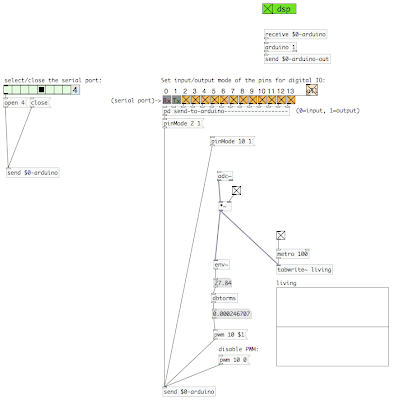
we're proposing to use our working prototype as a means to explore urban social behavior in relation to sound. by using puredata, an arduino, and a flexinol actuator, we have developed a simple mechanism which reacts to sound set at various thresholds. paired with a webcam or video camera, our prototype acts essentially as a lens cover which, when triggered by sound, reveals the source of the sound and/or the public reactions to the sound. when untriggered, the prototype obscures the lens.
the sites we are proposing to install our prototype(s) are the public phones located within new york, as well as other various private/public zones found within the sidewalk zones of the city. the public phones indicate a kind of space that are rarely used for their original intent, especially in new york where they're valued more for their advertising space, yet still maintain references to communication and still occupy a substantial amount of urban space.
our prototype could be consider a kind of modular unit which parasitically could attach itself to these various public zones. as a result of this system, we're proposing three scenarios, which could produce different results.
1. a singular module as a tool to explore social behavior in reference to urban sound
2. multiple modules located within a localized zone, which could communicate with each other to produce a kind of relationship with particular events, time, and proximity.
3. modules that could communicate globally, making a connection between different cultures and different urban sound spaces.
this is our first attempt at prototyping a modular unit to occupy our various locations/scenarios. the standalone unit allows the flexinol lens cover to obscure and reveal a camera based on the given sound input threshold, while the led reacts with pulse width modulation to the same sound source. the opacity of the mylar describes a location for possible video playback from other module sources, giving the unit the ability to record and capture video/sound, as well as project video/sound from other units. the low tech flexinol lens cover is revealed in a way that makes the act of recording explicit, while the variations in led intensity begin to reinforce the understanding of sound as input. the systems within the unit are contained yet don't attempt to become hidden surveillance. we're more interested in the possibility for a feedback loop with hopes that the input and playback might begin to play an interactive role with the behavior of the people passing by.
in this video, the flexinol's reaction to sound are only slight. this was mostly due to the acrylic melting upon contact with the heated wire. (by the way, that song is silent kid - pavement)
here is some video of us trying to use the kinetic output from flexinol reacting to a sound input as a screen to obscure and reveal the laptop's camera. for some reason, when we took the setup into the public to analyze the ambient/urban noises that our system would react to, it wouldn't perform, puredata kept crashing, and the flexinol wouldn't react more than once or at all... it may have been too cold.
using our pd toggle program, an arduino and a breadboard, we were able to activate a flexinol triangle to produce a kinetic output. the circuit includes a standard 9-volt battery and a compact relay.
using our mic-in program along with a couple decibel converters, we wrote a program using audio as input through the laptop microphone to control the pulse width modulation of an led (dimming). the led's intensity varies according to the amplitude of the sound input. we also have the audio signal writing to an array/wave.
with an arduino, a breadboard, and pure data, we modified our led toggle program to use a pulse width modulator (pwm) to simulate an analog output in order to dim an led.
now that we've figured out how to use the arduino as an output and sound as an input respectively, we're trying to figure out how to merge the two.
we wrote this simple mic-in program, multiplied with a simple toggle object for on/off (instead of the crazy sawtooth generator). we're hoping to be able to use this as input for the arduino-out rather than the digital toggles we have been using. (so far, we haven't been able to figure out how to do this)
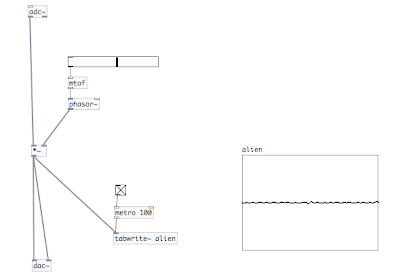
we altered a ringmod program to convert analog audio input to digital from the laptop's microphone, and then multiplied the signal with a sawtooth generator (phaser~) to enable an audio output (with a slider to change frequency). we also added an output to write the audio to an array/graph.
we used the standard mac volume control sound as the input. the audio output from the laptop speakers begins to act as an input through the laptop microphone, which creates an interesting feedback loop. (sorry about the horrible video resolution)
in pure data, we created a program to toggle an led to pulse at a given metro rate. half way through the video, we changed the metro rate from 100 (ms) to 500 (ms). this program also uses a digital toggle object as an input (on/off).
using puredata (a dataflow programming language much like max/msp, but opensource), we've set up a simple program to activate an led (on/off) with a digital toggle object.
these are the videos of our led arrays using the arduino software. the code was posted on oct. 7. both videos show the same example with different pacing/delays.
these guys do mostly data visualization, but they could be used as relevant inspiration in thinking about how technology and interaction can take on social issues (particularly oakland crimespotting)
we set up a system using piezo buzzers as both input and output. the input uses the piezo crystal's vibration sensor to trigger the output to make a noise. we had some difficulties finding the right code, and in the end, we were able to use another group's "touch sensor" program as a generic place to start.
Here's the code:
' {$STAMP BS2}
' {$PBASIC 2.5}
TriggerPin PIN 0 ' Input Pin
Main:
LOW 15 IF TriggerPin = 0 THEN buzzit ' Check for trigger, if pressed turn on buzzer DEBUG "off", CR ' show off PAUSE 1000 GOTO Main ' loop buzzit: DEBUG "buzzIT", CR HIGH 15 ' turn on piezo buzzer at pin 15 PAUSE 4000 GOTO Main ' loop
we were expecting the output buzzer to only trigger when the input was activated, however, this code seems to treat the input as more of an on/off switch.
the output buzzer also displayed some behavior that we're not quite able to explain. moving/touching the output was somehow disrupting the circuit and producing a strange/interesting noise effect.
in order to make sure that our radio shack piezo buzzer was compatible with the basic stamp homeboard, we downloaded a simple program that uses the buzzer to play midi ringtones. my guess is that the first song in the video is the star wars theme song...
here's the link if you want to rock out midi-style.